Why choose NoRemarks: the short answer
NoRemarks is ship management software for the ship and the office in one: reporting and investigations, planned maintenance, permits and risk assessments, checklists, drills, rest hours, certificates, purchasing and more — nineteen modules, with the app in English and Norwegian. It runs on the phones, tablets and PCs already on board, installed from the browser, and it keeps working with no signal.
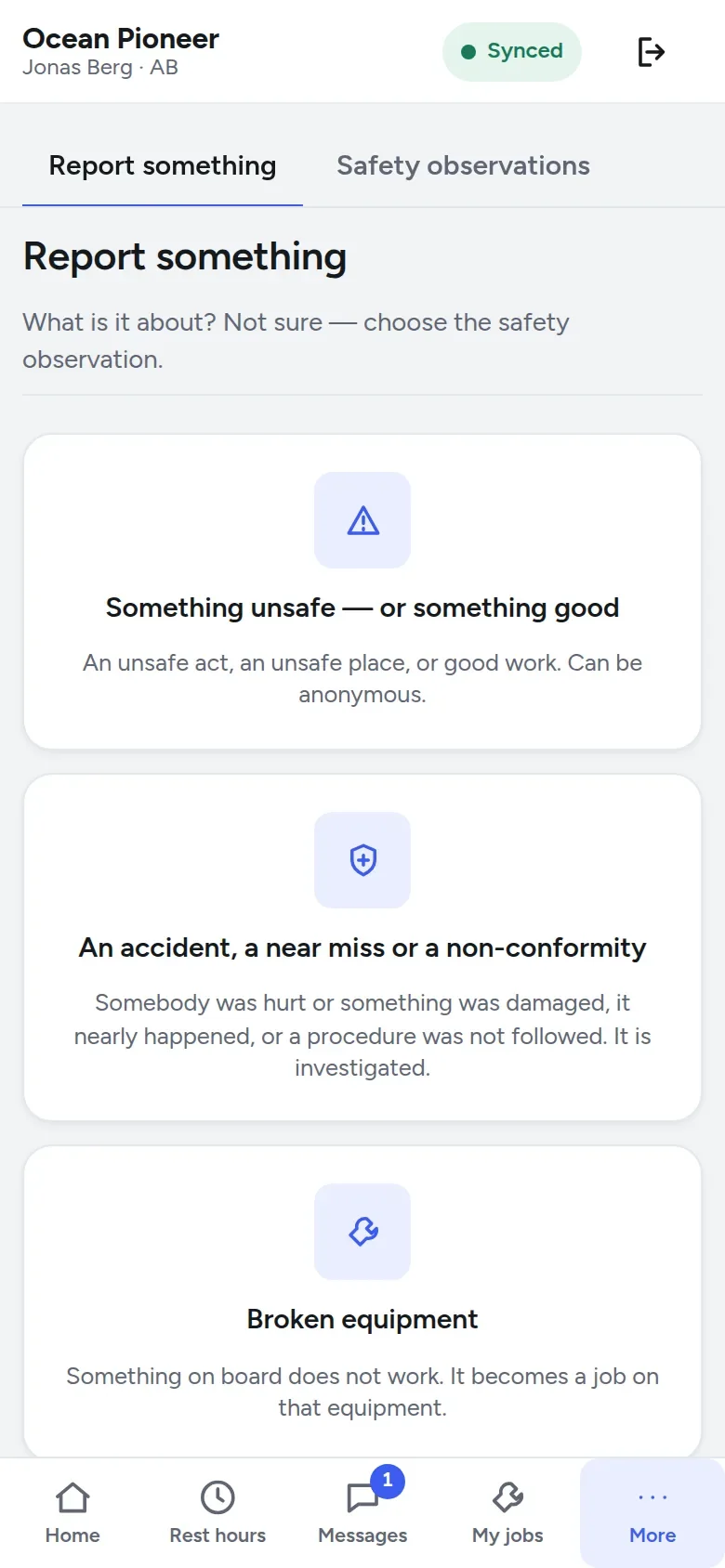
- Reporting is one button: Report something, on the home screen.
- The ISM Code’s cycle from report to closed case is built in, and whoever carried out an action never verifies it.
- Critical equipment, drills and rest hours are held to their rules on board.
- It works at sea, and the office sees the whole fleet on one screen.
- One price — NOK 1 999 per vessel per month excl. VAT, every module, unlimited users — and lower than what you pay today, guaranteed on these terms.
How it works on board: offline, on a phone and on the shared bridge PC
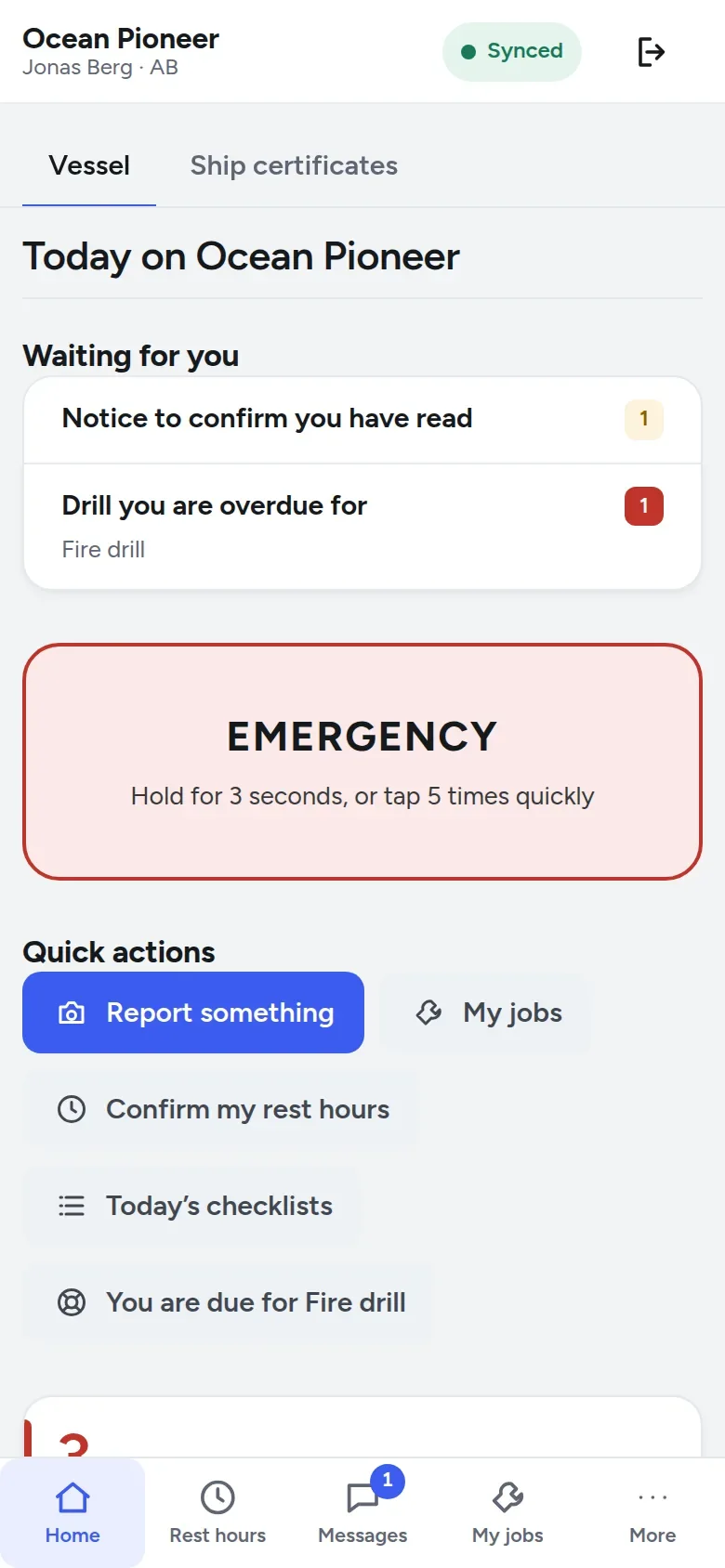
Everybody signs in as themselves at one address, app.noremarks.com, on a phone, a tablet or a PC, and adds it to the home screen to open it like an app. A rating with no email address gets a user name instead, such as rem.ola.nordmann.
The bridge PC belongs to the watch. Lock / switch person locks it behind whoever is using it, and the next person on watch signs in as themselves. Whoever locked it opens it again with their own PIN — at sea with no link too, because the device keeps a salted check of each PIN it has verified, never the PIN itself. The emergency alarm sits on the lock screen itself.
The work on board does not wait for the link. The device holds the vessel’s data and the same rules as the server, so a job closed or a rest-hour day confirmed is accepted or refused there and then, with the reason. Accepted work waits in a queue that survives a flat battery and goes when the link returns, and nothing is lost without a trace.
The badge at the top says where the device stands — Synced, Offline · 2 not sent, No contact with shore — and Save data, on from the start, pulls changes at most every few minutes rather than at once and fetches photographs when somebody taps them, while an alarm arrives at once either way. More on how offline works.
Non-conformity and incident reporting: from report to closed case
Report something offers three answers. Something unsafe, or something good, becomes a safety observation and can be anonymous. An accident, a near miss or a non-conformity becomes a case the company investigates. Broken equipment becomes a defect and a job on that component.
Paragraph 9.2 of the ISM Code asks for corrective action that lasts:
In NoRemarks that is one record in five steps:
- Reported by anybody on board: what happened, how serious it was or could have been, and who was involved.
- Investigated by the master, the chief officer, the chief engineer or HSEQ ashore: a cause category and the root cause.
- Corrective and preventive actions, each with a person responsible and a due date, marked overdue when it passes.
- Verified ashore by HSEQ, with a note on how — or sent back.
- Closed ashore when every action is verified or cancelled, with one question answered: how do you know it worked?
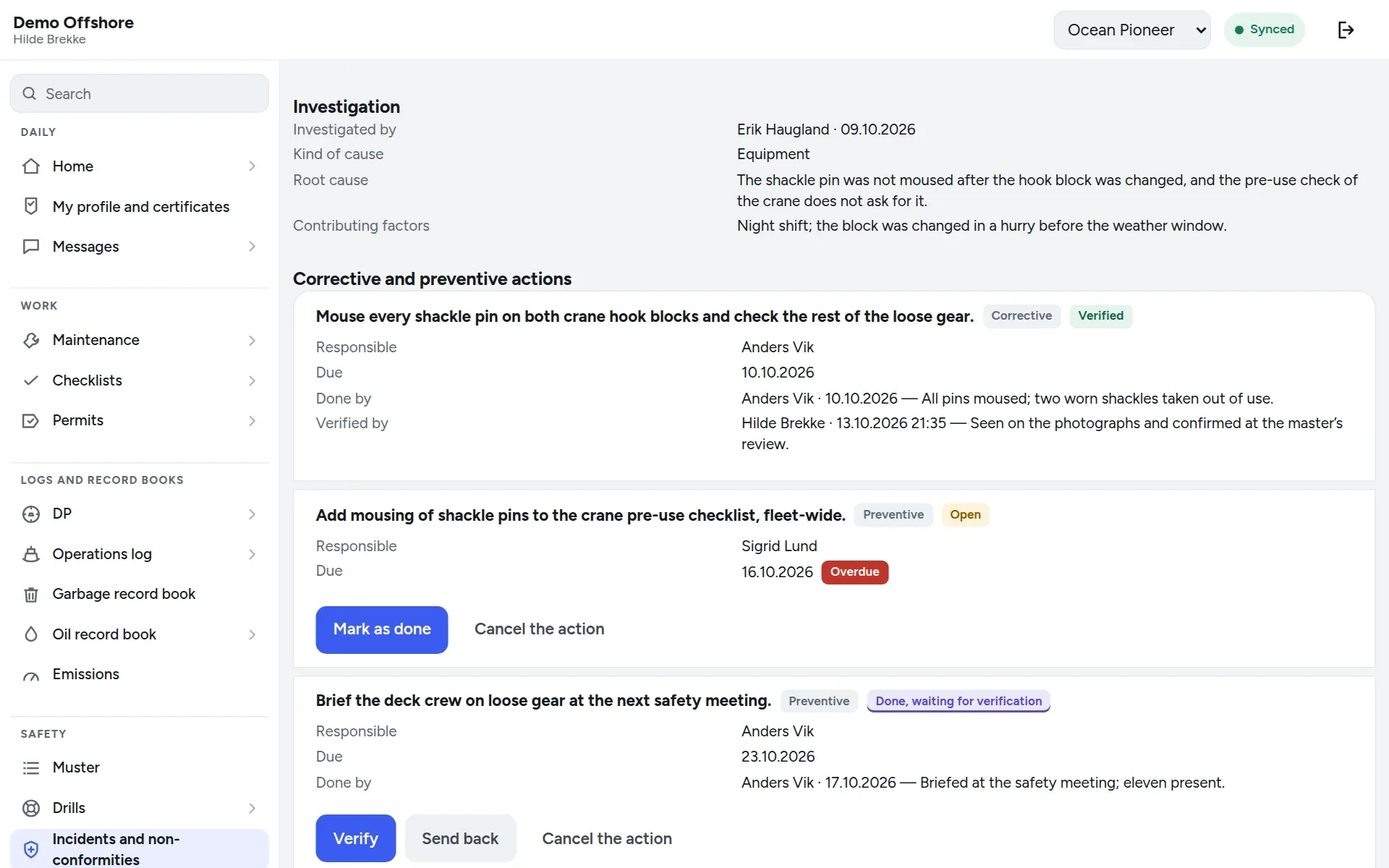
Every step is a line in the case’s history, with who and when: what an auditor reads to see that the action was taken and checked. More on reporting on board.
Planned maintenance, drills and permits, held to the rules on board
ISM Code 10.3, which every technical superintendent knows:
In NoRemarks criticality belongs to the component: it is marked Critical equipment (ISM 10.3), with the risk assessment behind it. A stand-by unit is marked as one, and its regular test — the emergency generator’s start test, the fire pump test — is a job of its own, planned on the calendar or on running hours.
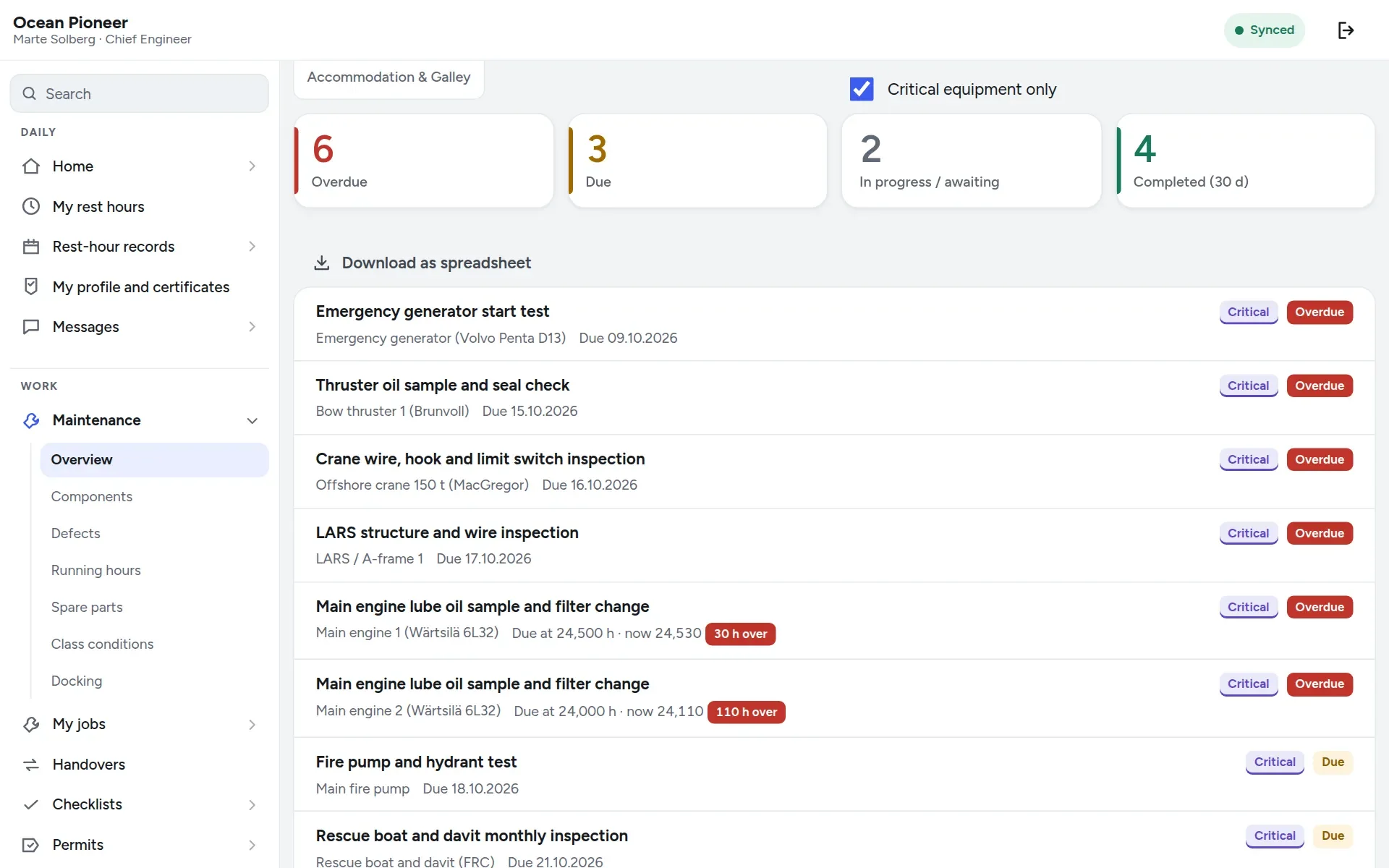
A job on critical equipment is never put off quietly: the request gives its reason, names the hazard being accepted and the measures that make up for it, and needs the master and the technical superintendent. The same job cannot be put off more than twice in a row. More on planned maintenance.
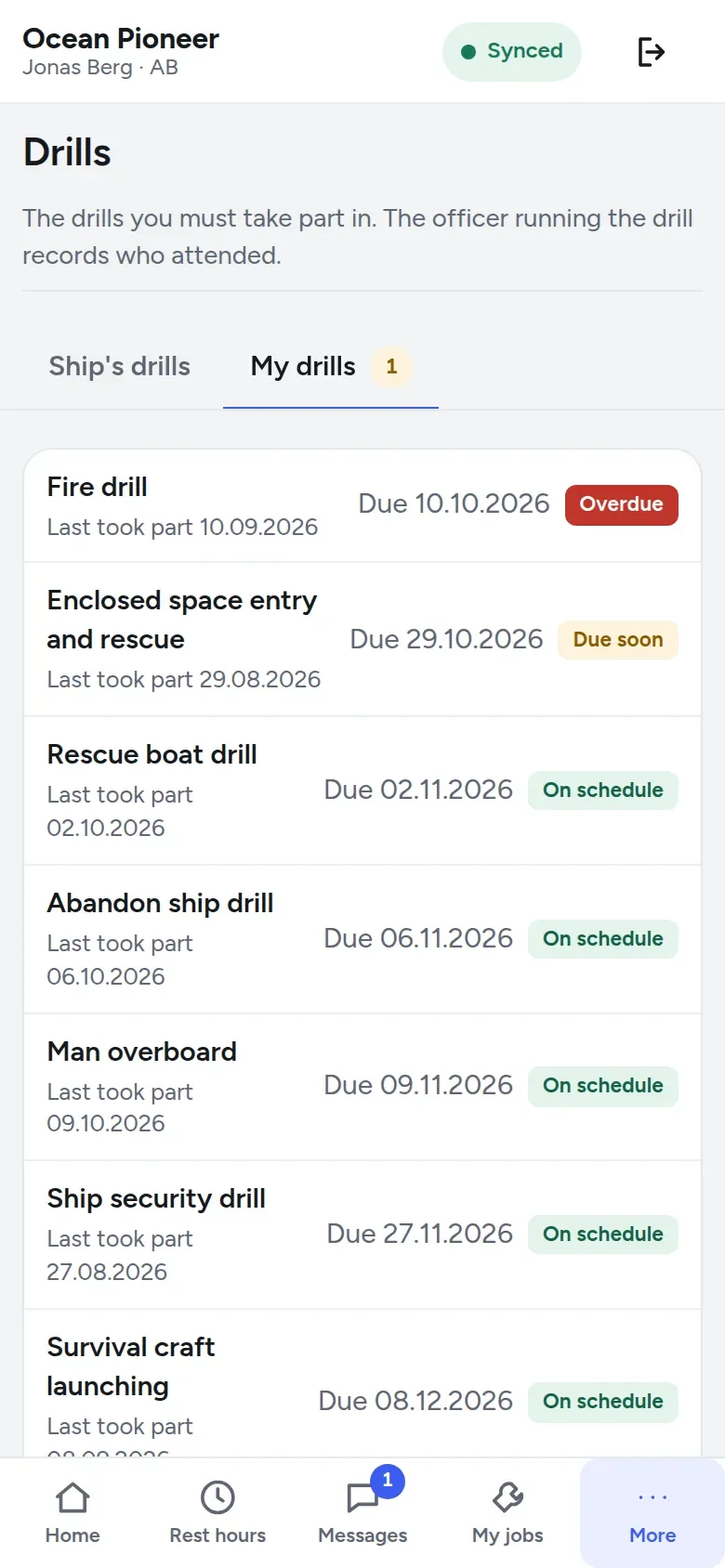
Drills are kept per shift and per person; thirteen starter drill types come with it, named in both languages, and a statutory interval can be shortened but never lengthened. Excusing somebody from a drill takes a reason, and the drill board warns when more than a quarter of the crew on board have not drilled in the last month — the usual picture after a crew change.
Permits are held as rules too: an enclosed space entry permit never runs past eight hours, every permit is checked against other work in the same and connected spaces, and a risk assessment is refused while any hazard in it has protective equipment as its only control. Why eight hours: the enclosed space article.
Rest hours: recorded on board, checked and signed
Rest hours start filled in: My rest hours fills the day in from the watch pattern, and the seafarer corrects and confirms it. Each day is held against the rest-hour limits — 10 hours of rest in any 24 and 77 in any seven days, in at most two periods, one of at least six hours, no more than 14 hours apart — and a stretch of work raises a warning at twelve hours, before it reaches fourteen.
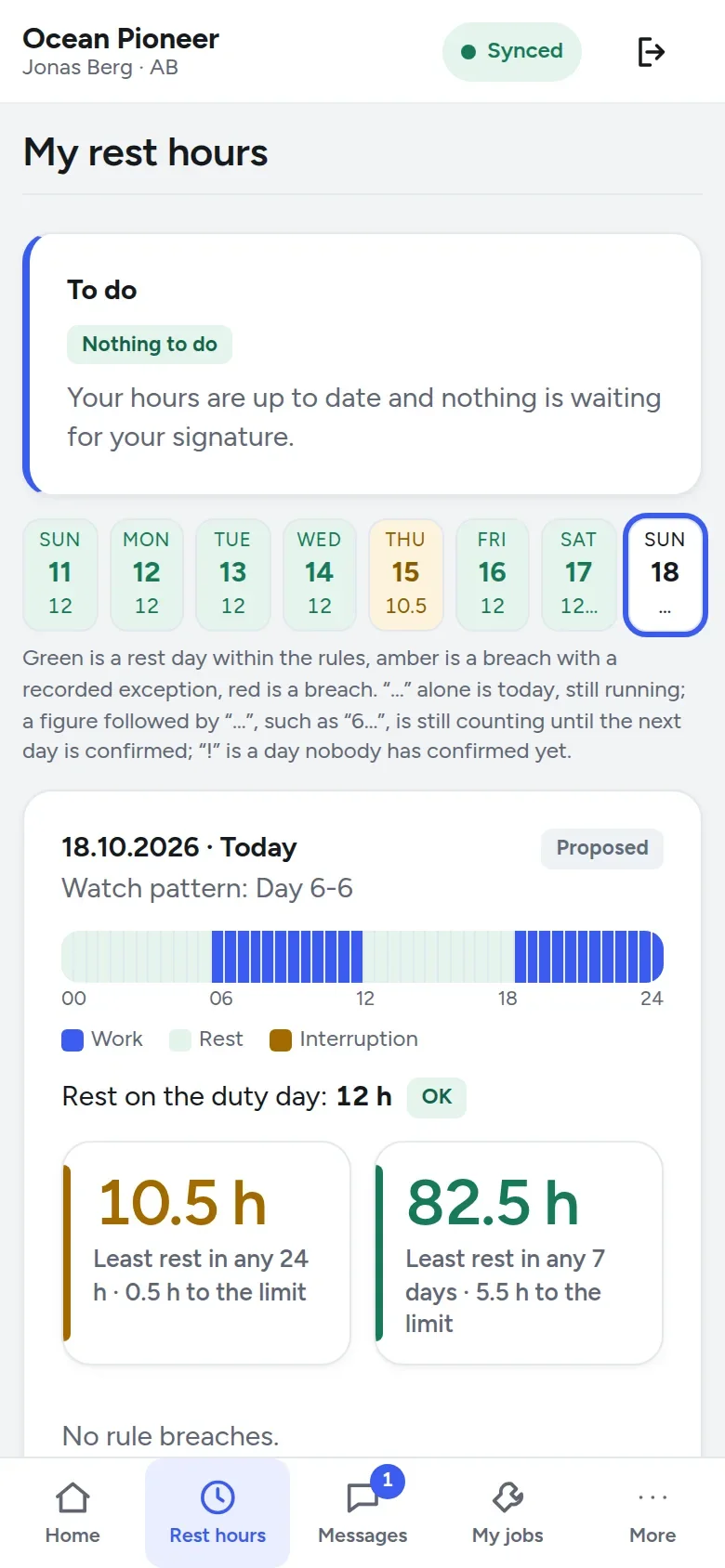
The master reviews the week on one screen, every breach in red. A day with a breach needs a comment, and the month is signed by the master and by the seafarer, each with their PIN. A correction after signing makes a new version, with the old one struck through and still visible, and the signatures lapse.
When the inspector comes aboard, Inspection mode shows the records read-only, amendment log included, and prints the whole crew on the KS-0300 or the IMO/ILO form. On a Norwegian passenger or cargo ship the duty is in the rest-hour regulation. More on work and rest hours.
Ship and office in one system: what the HSEQ manager sees
The fleet dashboard is the first screen in the office: one number per question an owner asks — new deviations this week, critical jobs overdue, certificates expired or missing, class conditions overdue, rest-hour breaches, drills overdue, purchases waiting — coloured by whether somebody has to act.
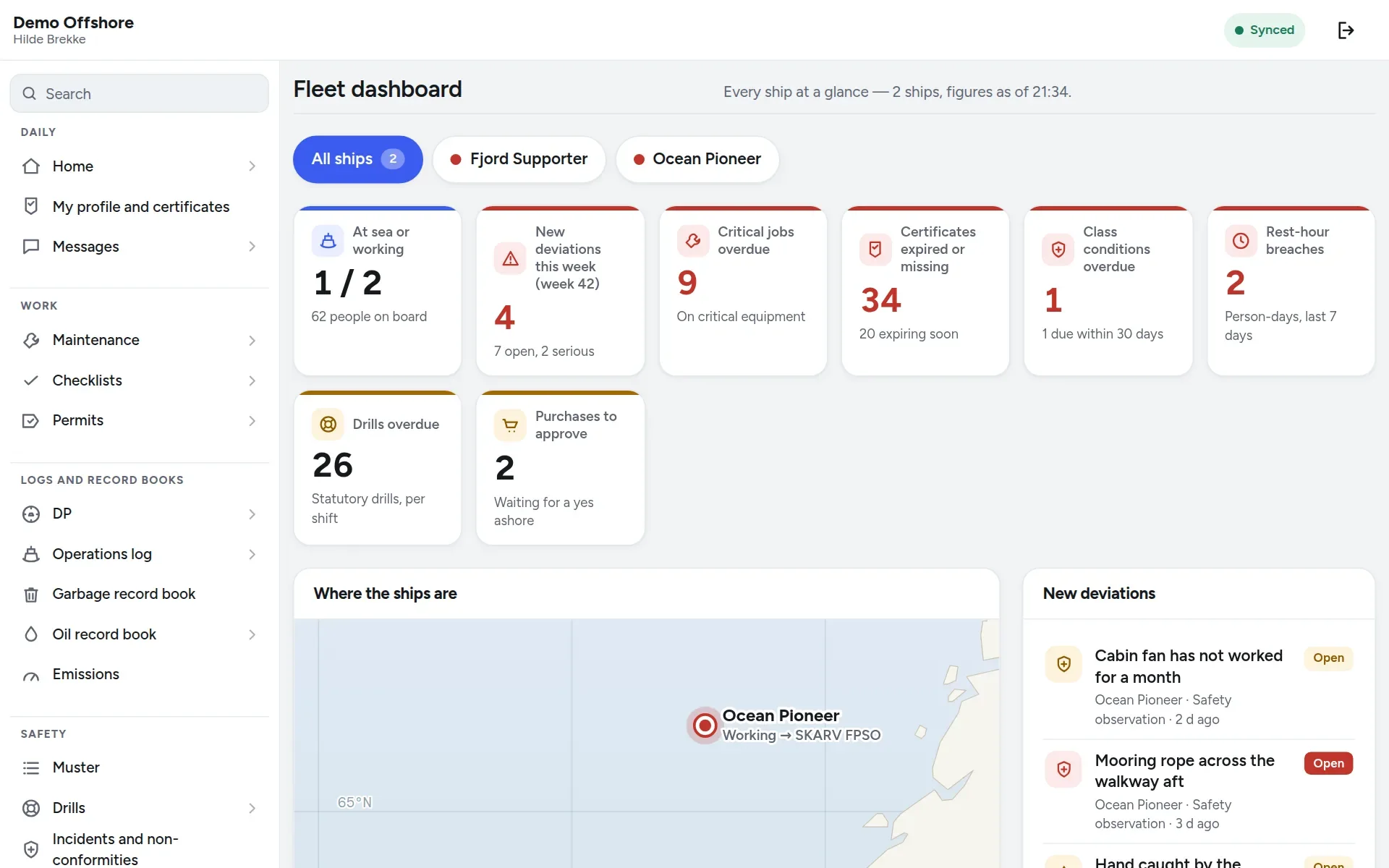
The monthly report sets any month beside the one before, for the fleet or one ship — maintenance on time, critical equipment on its own lines, defects, observations, cases, certificates, rest-hour breaches — printed or as a spreadsheet. The certificate matrix covers the fleet, and the rotation planner marks a relief whose certificate will not last the trip — Invalid for the trip: COC.
Checklists have versions approved by somebody other than their author, a signed record keeps the wording it was signed under, and a “no” must be explained. Every change the server accepts goes into an audit trail, one chain per vessel and one for the company: who, on which device and when, each entry chained to the one before, and readable in the product as the Change log. The company can export everything, files included, without asking us and without a fee; more on security and export.
Norway’s regulation on safety management for smaller cargo ships, passenger ships and fishing vessels puts the duty in its § 2:
In NoRemarks a small ship keeps its deviations, risk assessments and maintenance on the same screens as a large one. More on the fleet office and checklists.
The price: lower than what you pay today, guaranteed
NoRemarks costs NOK 1 999 per vessel per month excl. VAT: all nineteen modules, unlimited users and support from the people who wrote it. No setup fee and no charge per user or per module; the first two months are free for every vessel you add, and no card details are asked for.
The price is per vessel, not per seat, for a safety reason: every signature, permit and rest-hour record is personal, and a price per user is a reason to share a login across a watch.
To use the guarantee, send us the contract or an invoice showing your price per vessel per month for the vessels you would move. Our offer comes back in writing, the price in it held for five years.
If a subscription ever lapses, the vessels keep recording what they are required to record, and everything recorded stays readable and exportable — see the price page.
From yes to the first vessel
- Try the demo at demo.noremarks.com, PIN 1234: two vessels with their crews and history. Sign in as Hilde Brekke, the designated person ashore (Office – HSEQ), for the office, or as Jonas Berg, AB, for the deck.
- Ask for the two free months on the form; no card details are asked for.
- Add a vessel and invite her master to do the rest on board: a flag, a time zone and a master are all she needs to start.
- Bring in the maintenance register, the crew list and the certificates from Excel or CSV, checked row by row in a dry run first. Moving a register in.
- Ask us anything: support is by email, weekdays 08:00–16:00 Norwegian time, from the people who wrote the code. Something that stops a ship is answered within 2 hours during opening hours. There is no round-the-clock watch: sent outside those hours, it is answered within 2 hours of our opening.
If the decision is yours, start with half an hour on the demo ship or your own vessel — ask for a demonstration, or read how offline works first.
Questions
What is ISM software?
Software in which the work the ISM Code asks for is done and kept: checklists for key shipboard operations (7), corrective action that prevents recurrence (9.2), critical equipment kept reliable and stand-by equipment tested (10.3) — the ship and the office on the same records.
How often must internal ISM audits be held?
On board and ashore, at intervals of no more than twelve months, exceeded in exceptional circumstances by three months at most (ISM Code 12.1). In NoRemarks the case histories, maintenance and drill records, rest-hour sheets and change log are there to open.
What does ISM Code 10.3 require for critical equipment?
Paragraph 10.3: identify the equipment whose sudden failure may cause a hazardous situation, promote its reliability, and regularly test stand-by equipment and systems not in continuous use. In NoRemarks that is a component marked critical, and a test job of its own.
How long must rest-hour records be kept on board?
On a Norwegian passenger or cargo ship, at least six months after they are filled in (FOR-2007-06-26-705 § 12); under another flag, that flag’s rules say. In NoRemarks the records print from Inspection mode, on the KS-0300 or the IMO/ILO form.
What does NoRemarks cost, and does it work offline at sea?
NOK 1 999 per vessel per month excl. VAT, every module, unlimited users, two months free and the price held for five years; show us what you pay per vessel today and we offer less, in writing. And yes, it works offline: the work on board is recorded on the device and sent when the link returns.
Who can report, and can it be anonymous?
Everybody on board. An observation card can be anonymous, and stays so if it becomes a case; a case names its reporter, because somebody has to be asked.
Can we bring our data from the system we use today?
Yes. Components and jobs, running hours, job history, spare parts and stock, the crew list and the crew’s and the ship’s certificates come in from Excel or CSV — an export from today’s system, or our template in English and Norwegian — checked row by row in a dry run before anything is written. A sister vessel’s register can be copied too.
Where is our data kept, and can we take it with us?
In the European Economic Area. Every change the server accepts goes into an audit trail, one chain per vessel and one for the company, each entry chained to the one before. The company can export everything as a ZIP, files included, whenever it wants, without asking us and without a fee, and if a subscription lapses, everything recorded stays readable and exportable. Our security page says how.
Sources
- The ISM Code as amended by MSC.273(85): MCA Merchant Shipping Notice MSN 1826 (M), July 2010
- FOR-2007-06-26-705: regulation on working hours and rest hours on Norwegian passenger and cargo ships (Lovdata, in Norwegian)
- FOR-2016-12-16-1770: regulation on safety management for smaller cargo ships, passenger ships and fishing vessels (Lovdata, in Norwegian)
- IMO Resolution MSC.581(110): Revised recommendations for entering enclosed spaces aboard ships (27 June 2025)
- NoRemarks: the price, and the terms of the price guarantee
- NoRemarks: how offline actually works
- NoRemarks: security, data protection and export
- NoRemarks: questions shipowners ask, including moving a register in